
Abstract
The post is about my journey into Agentic system. It started with simple need to automate the stock analysis workflow, eventually becoming my 1st step into Agentic System. The subsequent post unravels my journey as I build the system.
The Challenge
My analysis flow was fairly simple, I would look for signals on UnusualWhales, then based on that do more analysis before narrowing down the potential candidates. I wanted to make it more dynamic to merge different indicators and spot things which sometime was challenging with human eyes. However due to time constraints or other commitments, would mostly miss timely analysis. To remove myself as a bottleneck, I created the agentic system and named it Kira.
This may feel a bit like Automation, as I have eliminated some specific details on processing to keep post centered on Agentic AI and not become a Stock analysis post.
Key Objectives
- Build working system, even automation is of big help
- Use Claude code to do all of the work
- Avoid need to buy additional subscriptions (unless necessary) leverage existing subscription to UnusualWhales
- Have a feedback mechanism where the system can keep updating the prompt/filter to refine the past decision
The Journey
Had heard a lot about Agentic System, but never built one. This presented a perfect opportunity to jump into the echo system and explore further. An important aspect was to build something working and iterate on it, rather than acquiring all the knowledge to do it, in short avoid jargons and analysis-paralysis.
High Level Flow
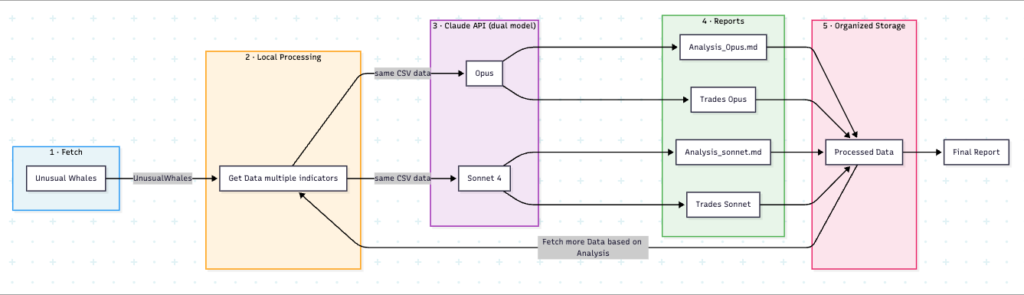
During planning phase, Claude recommended various approaches, most notably using pure Python vs hybrid n8n and Python. However choose to go with pure Python, as it’s a good skill to add.
Attempt 1: All Context in one go
Armed with the information, gave all the requirements to Claude Code based on the High Level flow. In a few minutes, a project was ready. However, it did not workout. Code didn’t compile and it did a lot of things which were not asked for. After a few trials fixing it and maxing out the Claude usage, abandoned the project. This was possibly an area I need to improve on how to use it more effectively. To save time, decided to choose a different approach
Attempt 2: Incremental build
Building the basic block
After the failed attempt, decided to build the system like I have built in real life. Broke the System into small features and incrementally added functionality. Started with getting the data from UnusualWhales. It took a while as I didn’t want to invest in API’s and wanted to reuse my existing subscription. After a few attempts, Claude got it correct and was able to download the report. Learning here was to be very precise with field name. Asked Claude what would help to avoid mistakes and random errors. Listened to Claude’s response and incorporated the feedback.
LLM Analysis
Once the report was generated, next step was to do additional analysis.This is where I got stuck, as I didn’t have API access. Fortunately, this was simpler problem. Added some credits for API access and was ready to go.
NOTE: I ran into a weird problem that, Claude UI wouldn’t complete my purchase request, so I ended up retying. At the end both the transactions went through. I did turned off the auto-load option to avoid billing shock.
Once ready, asked Claude code to add code to call Claude via API and perform the asked analysis. Avoiding the details as it is custom analysis and I am not a Pro-analyst. Once it started working, decide to get analysis done via multiple models (Sonnet and Opus) to compare the results. Building incrementally worked out great.
The end result was a report on analysis which could be used to make trading decision (or try paper trading)
Towards the Agentic mode
Once the basics were working, it was time to add decision making capabilities to the system. As of now the System is not super smart, but works within constraints of taking decision and doing further analysis of selected stocks. The agentic part is fairly small here on purpose. It does make multiple calls to Claude for decision making. The agentic part is going to be refined as the System run and takes feedback.
How much did it Cost
- UnusualWhales – Already had subscription, so no additional cost
- Claude Code – Already have subscription, so no additional cost
- Claude API – This is based on usage. Opus is significantly costlier than Sonnet. Each complete workflow costs around $4 (it makes multiple calls to the model)
- Time: Build the system over the weekend
Lessons’s Learnt
Building the System initial does take a while to get used to it, however things become easier as we start understanding it better. The System is working, did hit my usage limit several times, which slowed down the development but eventually it worked. As a conclusion, here is what I learned
- Starting small and incrementally building worked better for me
- Have to be very precise with instructions with Claude. If we use simple language, it may use related words to complete work, that may not always work
- It works like a junior engineer, very eager to complete task. It tries to a lot more than asked, possibly to impress the user 🙂
- Cost quickly goes up, keep an eye on it
- It does lower the barrier for using a technology/language, however familiarity is a must to make informed decision
- Very little control over the way the code is written, self debugging quickly becomes a challenge.
What’s Next
As a next step, going to add more capabilities like looking at previous decision, reevaluating the criteria used for decision making, and updating if needed. This would involve storing it in some persistent store, with versioned decision and possibly add additional signals in decision making process.
Most important would be to paper trade with recommendations and see how good the recommendations are.